
Kaleidescape App 2.0 Review: The Best Way to Control Your System
If you own a Kaleidescape system and you're not using the mobile app, you're leaving one of the best parts of the entire ecosystem on the table. The recently released Kaleidescape App 2.0 is a major revision that finally brings a replacement for the aging Second Screen app, and it consolidates everything into one polished, full-featured interface. I've been living in this app daily across my iPhone, iPad, and MacBook Pro, and I want to walk you through every section so you understand exactly what it can do.
📺 Watch the full live overview on YouTube: Kaleidescape App 2.0 Massive Review for Movie Management & System Control
One App to Rule Them All
Historically, Kaleidescape shipped two separate apps: the main Kaleidescape app for store browsing and remote control, and Second Screen for navigating the content actually downloaded to your system. Second Screen worked, but it is dated and forced you to bounce between two apps for what should be one experience. With App 2.0, the new My System tab effectively absorbs everything Second Screen did and brings it into a modern, unified interface. One app, one login, every capability.
The app is available on iOS, iPadOS, Android, and yes — there's a Mac App Store version too, which is essentially the iPad app released for macOS. I'm an Apple guy through and through, so I bounce between all three depending on where I am computing.
Browse: The Full Kaleidescape Store in Your Pocket
The leftmost tab is Browse, and this is essentially the Kaleidescape store rendered natively. You get the same rotating banner of content you'd see on the web store, plus all the familiar strips: New Releases, Special Pricing, Discover Favorites, Content Sets, Filmmaker Spotlights, Pre-Orders, and more.
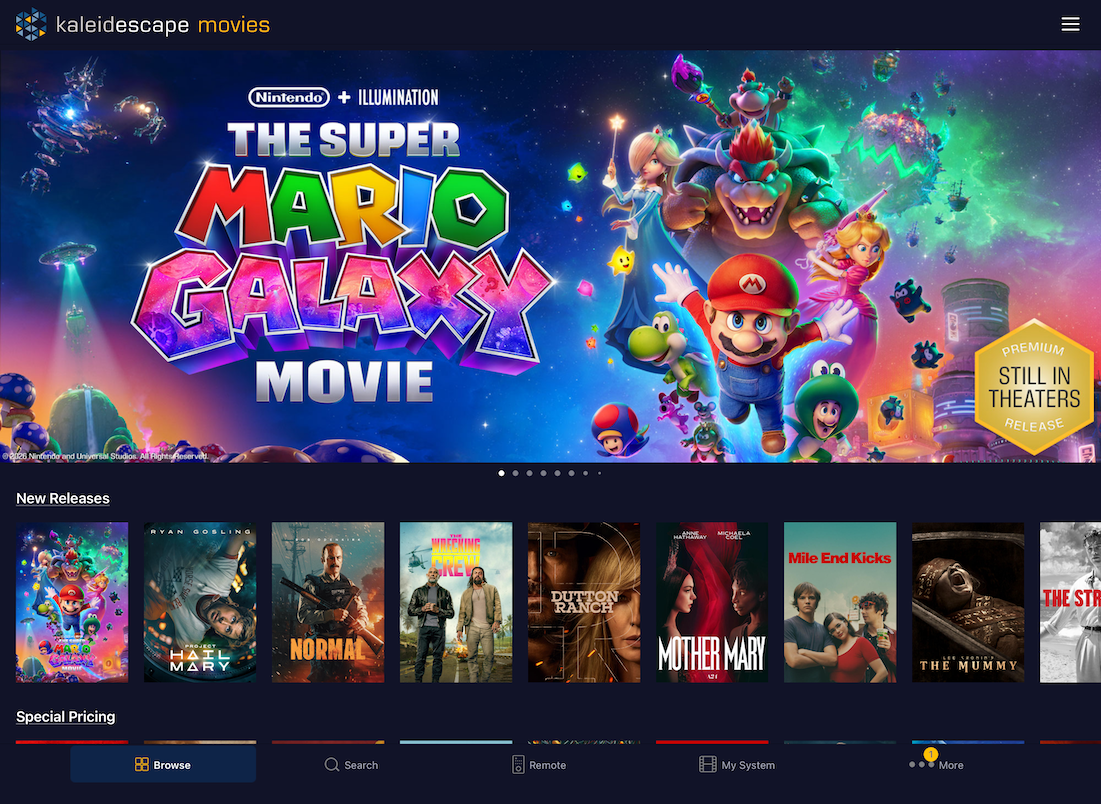
Tap into any title and you get the full details treatment — synopsis, trailer, Rotten Tomatoes scores, runtime, age rating, and the technical specs that matter to enthusiasts: 4K, SDR, HDR10, Dolby Vision, Dolby Atmos, and/or DTS:X. Cast and crew names are clickable, so if you want to fall down a Russell Crowe rabbit hole, you can. Genre links, director links, all of it navigates deeper into the store.
The hamburger menu in the upper right gives you quick jumps to:
Movies by genre or browse all
Studios
Music and TV content
Content Sets
Filmmaker Spotlights
Premium content
Pre-orders
Recently added
Special pricing
Sorting and filtering are robust. You can filter by Rotten Tomatoes availability, ownership status, quality tier, and more. Sort by store availability date (my personal default for spotting what's new), or by lowest price if you're hunting for budget additions to your library.
At the bottom of the menu you'll find contextual collections — DC Universe, James Bond, MCU, Star Wars, and others. I'm not sure if these are personalized or fixed, but the Star Wars and Marvel jumps line up suspiciously well with my own tastes.
Purchasing and Wishlisting
Buying content in the app is seamless. On Mac, you authenticate with Touch ID. On iPhone or iPad, Face ID or Touch ID. When you purchase, you get the option to specify exactly which version downloads — HDR10 vs. Dolby Vision, for example — which is critical. Always validate the format before you commit, and decide whether you actually want it to download immediately or just have it wait in your library for later.
The wishlist feature is one I strongly recommend using with my clients. Add a title to your wishlist and Kaleidescape emails you when it goes on sale. It's the single best way to build your library at a discount without constantly checking the store.
Share buttons hook into the native OS share sheet, so you can fire titles off to messages, contacts, or anywhere else in your ecosystem.
Search That Just Works
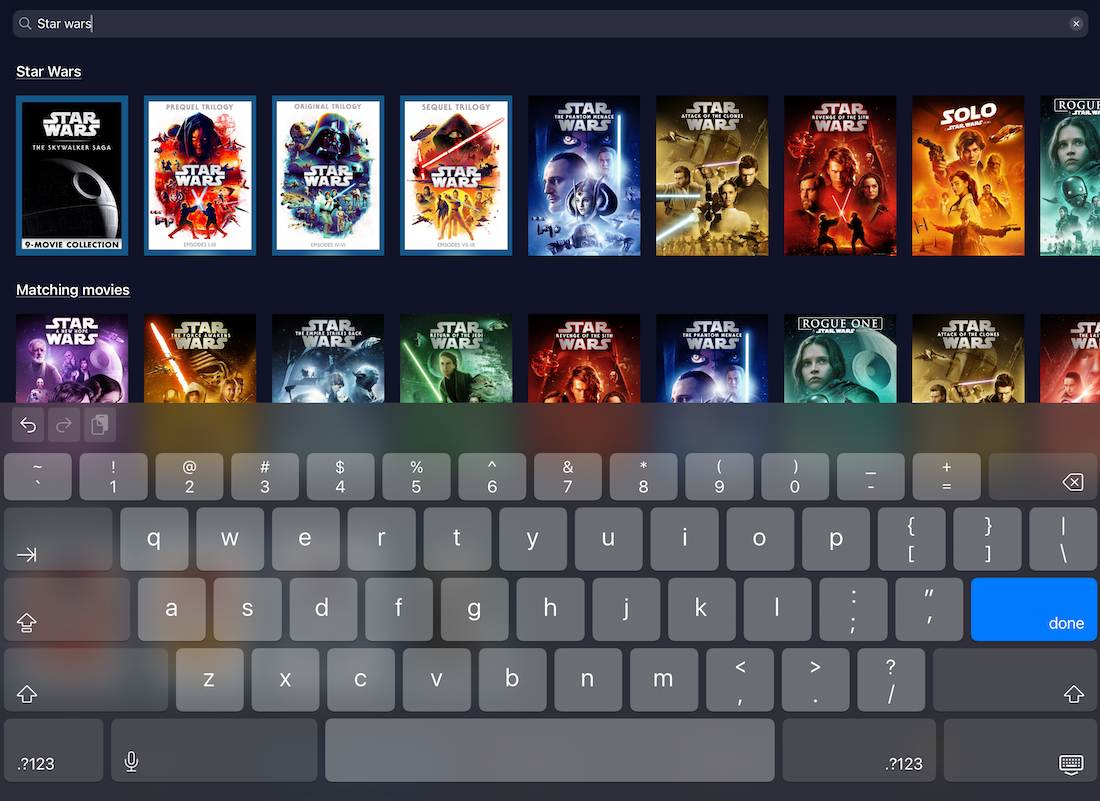
The second tab is Search, and it behaves exactly like the web store's search. Type "Star Wars" and you get a dedicated strip, matching individual movies, matching content sets — all the relevant context. Search across titles, people, and genres.
The Remote Control: Probably How You Already Use the App
The middle tab is the long-standing remote control. For a surprising number of Kaleidescape owners I work with, this is the primary way they drive their system, especially folks who don't have a Control4 or similar universal control setup, and who don't use the standard IR remote.
Gestures are dialed in well. Swipe in any direction to navigate. Tap an outer edge to step one increment. Hold on the edge for continuous scroll. Tap to show details or select a menu item. Long press to play. Once you internalize the gestures, navigating your library feels faster than any physical remote.
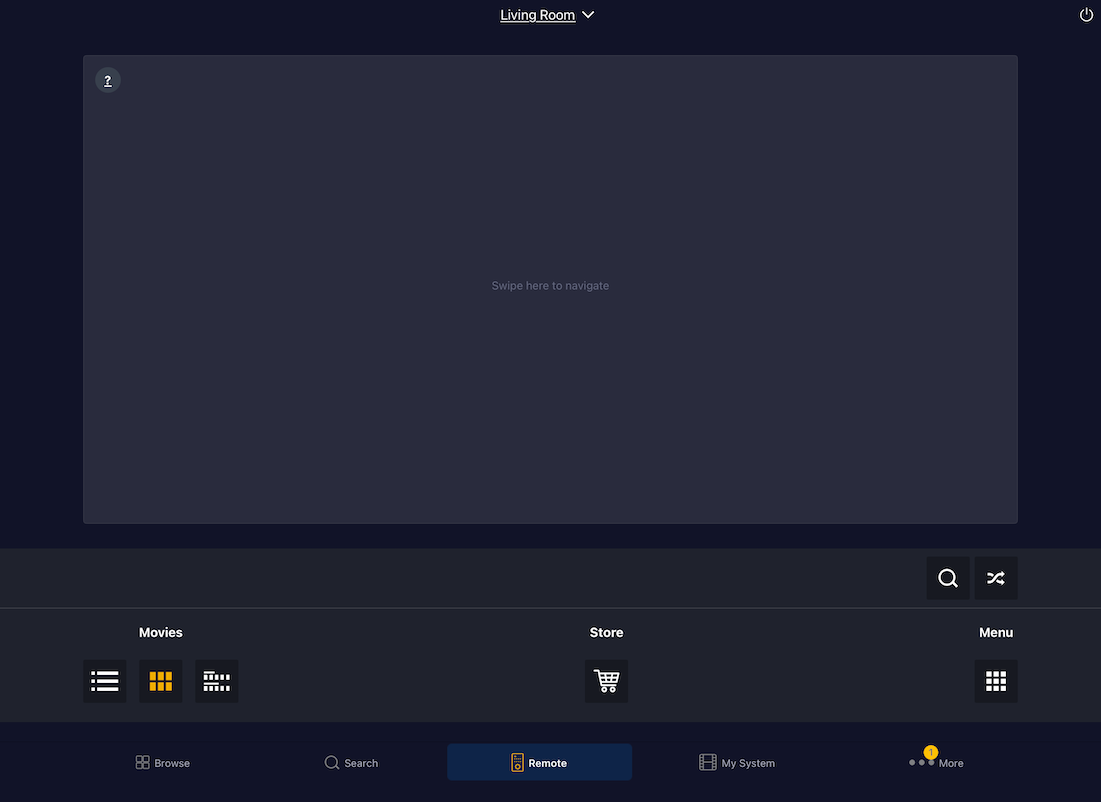
You can also push specific UI sections directly to the on-screen player — jump to List view, Cover Art view, Collections, or the Store. During playback, you get an information button (which surfaces the on-screen info overlay), intermission mode (pause with cover art shown — perfect for bathroom breaks and snack runs), volume control if you're using HDMI CEC, pause, fast-forward, and stop. The shuffle button is a Kaleidescape signature and it reshuffles your cover art wall every tap.
If you have multiple players or multiple systems, you can connect to whichever one you want and control them independently.
My System: The Headline Feature of 2.0
This is the big addition and the reason this update earns the 2.0 designation. My System is your locally downloaded content rendered as a beautiful, navigable in-app interface. The remote tab controls what's on your screen. My System lets you browse your library inside the app itself.
For context, I have a 48TB Terra Server with somewhere north of 500 movies downloaded. My System gives me full visual access to all of it, organized however I want.
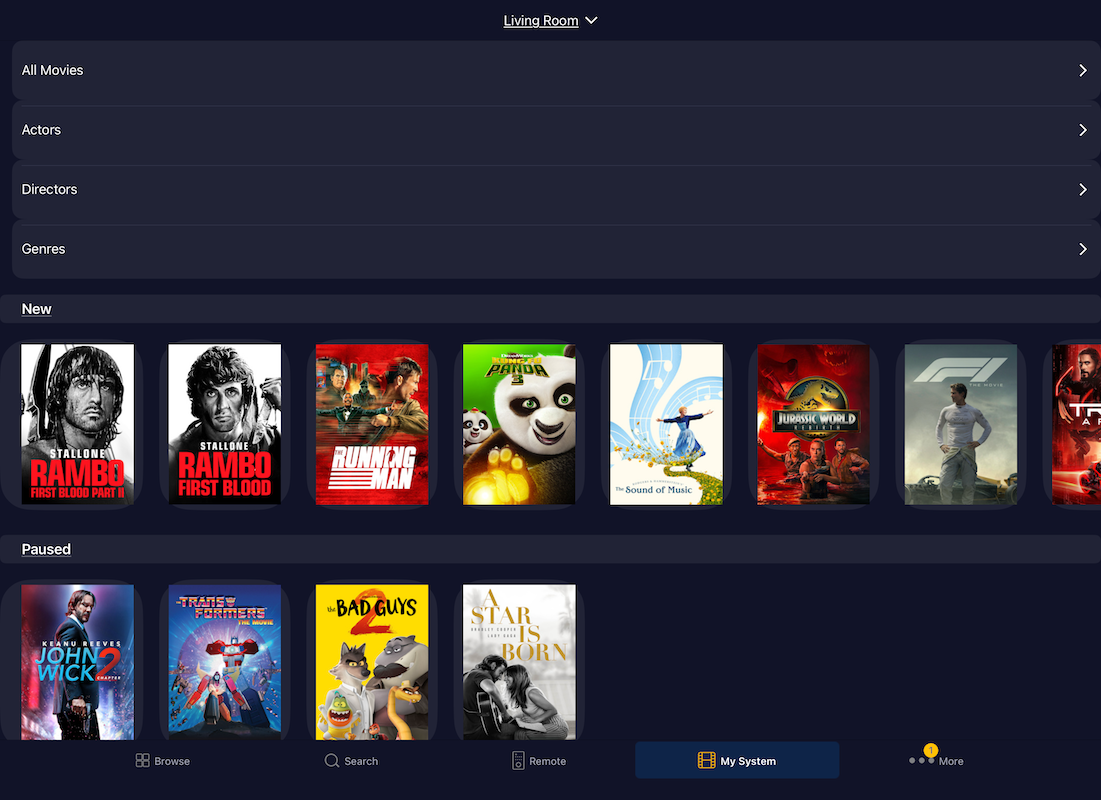
You get:
All Movies — everything downloaded, with alphabet quick-jumps for fast navigation
Actors — tap any actor (Kenny Baker, for example) and see every downloaded movie they appear in
Directors — same logic; J.J. Abrams pulls up every Abrams film on my system
Genres — filtered by Kaleidescape's metadata
Recently Added — leftmost is most recent, perfect for tracking what you've just downloaded
Paused — every movie you started and stopped, with resume-or-restart options
Played — everything you've watched in full, most recent first (I knocked out a six-movie marathon over a weekend and it's all sitting right there)
Collections — including your custom collections
Tap any title and you can trigger playback to your system, jump to specific scenes, or play the trailer. Importantly, this is not in-app mobile playback. You're commanding your Kaleidescape player to play. The app is the control surface; the player still does the heavy lifting.
One detail I love: you get full access to extras associated with your downloaded content. Special features, shorts, deleted scenes — all browsable in list format with play-all or play-individually options.
Collections and the One Feature Request I'd Make
I keep custom collections for series like Bond, DC, Harry Potter, Lord of the Rings, Marvel, Star Wars, and a "Dad Stuff" collection I made during my marathon for movies I'd watch solo. Songs is a default collection I'd love to be able to hide, but it's a system collection and can't be removed.
Here's my one ask for Kaleidescape: let me manage collections directly inside the My System tab. I should be able to add to collections, remove from collections, and create new collections without diving into the web interface or working through the on-screen UI with a remote. I work in software professionally, so I know — there's always a next feature. But this one feels like a natural extension of what's already here. I expect this will come in a future update.
The More Tab: Account and Library Management
The fourth tab is More, and it's where the deeper management lives.
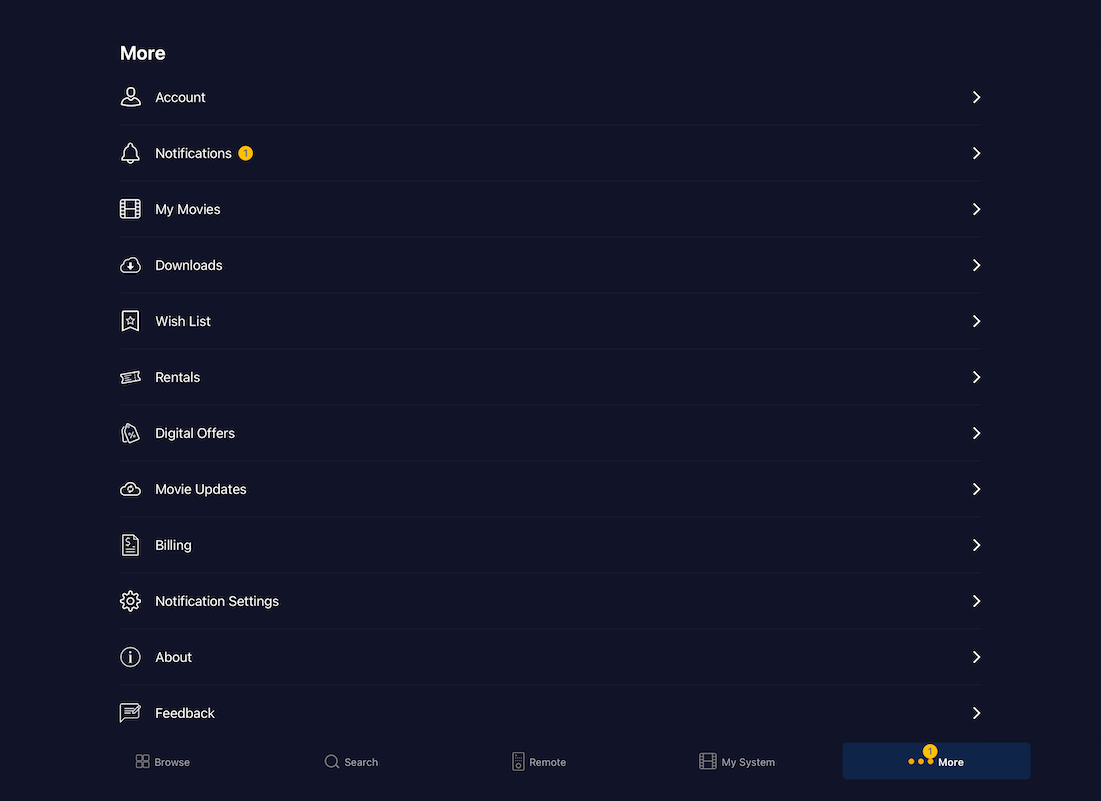
My Movies is distinct from My System's All Movies view. This is everything you own — downloaded or not — sortable by title and other criteria. From here you can kick off downloads, delete downloaded content, and manage what lives on your server. If you're tight on storage and need to clear space, this is the tab.
View Downloads shows active downloads and download history with format and timestamp. I'd love to see download rate displayed here the way it is in some of the web interfaces, but that's a minor nit.
Wishlist is already covered above, but worth reiterating: use it.
Rentals isn’t for me as much since I'm a library builder, not a renter, so I rarely touch this. But if you rent, it's all here to track and manage.
Digital Offers is where upgrade pricing and Disc-to-Digital offers surface. I've got Charlotte's Web sitting there as a 4K upgrade for $4.92. If you've registered discs through the Disc-to-Digital program, your eligible offers land here. (I have full videos on the Disc-to-Digital workflow on the channel if you want the deep dive.)
Movie Updates is one of the underappreciated strengths of the Kaleidescape ecosystem. When a title gets improved — added extras, additional audio tracks, fixed encoding, corrected audio or video issues — Kaleidescape repackages and pushes it out. You re-download the improved version for free. Try doing that with a disc. You can't. You're stuck with whatever pressing you bought.
Billing, notification settings, and account details round out the section.
Key Takeaways
App 2.0 replaces Second Screen by absorbing its functionality into the new My System tab
Browse gives you the full Kaleidescape store with capable sorting and filtering
Remote control is gesture-driven and powerful enough to be your primary control method
My System lets you navigate your downloaded library inside a beautiful in-app interface
Movie Updates and Digital Offers are two of the most underrated features in the entire ecosystem
Available on iOS, iPadOS, Android, and macOS — get it on whatever device you actually use
Get the App. Use the App.
If you're in the Kaleidescape ecosystem and you don't have App 2.0 running, you're missing perhaps the easiest, most polished way to interact with your system. Download it, authenticate, connect to your players, and make it part of your daily movie enthusiast routine. It's that good!
And if you're shopping Kaleidescape — whether you're entering the ecosystem for the first time, upgrading an existing system, or building a reference theater — I'd love to help. I'm a Kaleidescape dealer and integrator, and I work with the full lineup of brands I use and trust in my own systems: Trinnov, SVS, JVC, Focal, Seymour, madVR, WattBox, and more. Get in touch today!